2. The drawing is not the circuit
A schematic is a rendering of a netlist, and the two can disagree. The ways they do, and which ones a tool can catch.
Here is a question that sounds trivial and is not: are these two pins connected?
You would think you could tell by looking. Two wires meet on the page, so they are joined. A wire runs from a pin to somewhere, so that pin is on that net. Neither of those is reliably true. A schematic looks like one thing and means another, and a particular class of expensive bug lives in the gap between the two.
Read EE1 first, and chapter 1 for what the parts are doing.
This page teaches at EE2, and the levels page says what each level means.
The drawing is a rendering (EE2) 
A CAD tool actually exports a netlist, and the board gets built from it. A netlist lists the nets and, for each one, the pins that share it. The picture on your screen is one rendering of that netlist, drawn by a human for other humans.
Most of the time the two agree, so people come to trust the picture, and that trust makes a disagreement dangerous. Imagine the drawing shows a connection the netlist does not have. Every human in the review chain sees the connection, because they are all reading the same picture. The board comes back and the connection is absent.
This chapter is about those disagreements. A tool that reads the netlist looks at what gets built rather than at what got drawn.
One dot changes the circuit (EE2) 
The clearest case. Two schematics, three components each, the same wires in the same places. They differ by a single construct, a junction dot placed where a tap wire meets a horizontal one. (Their title blocks differ too, so you can tell which file you are looking at.)
Here they are. Look for the difference before reading on.
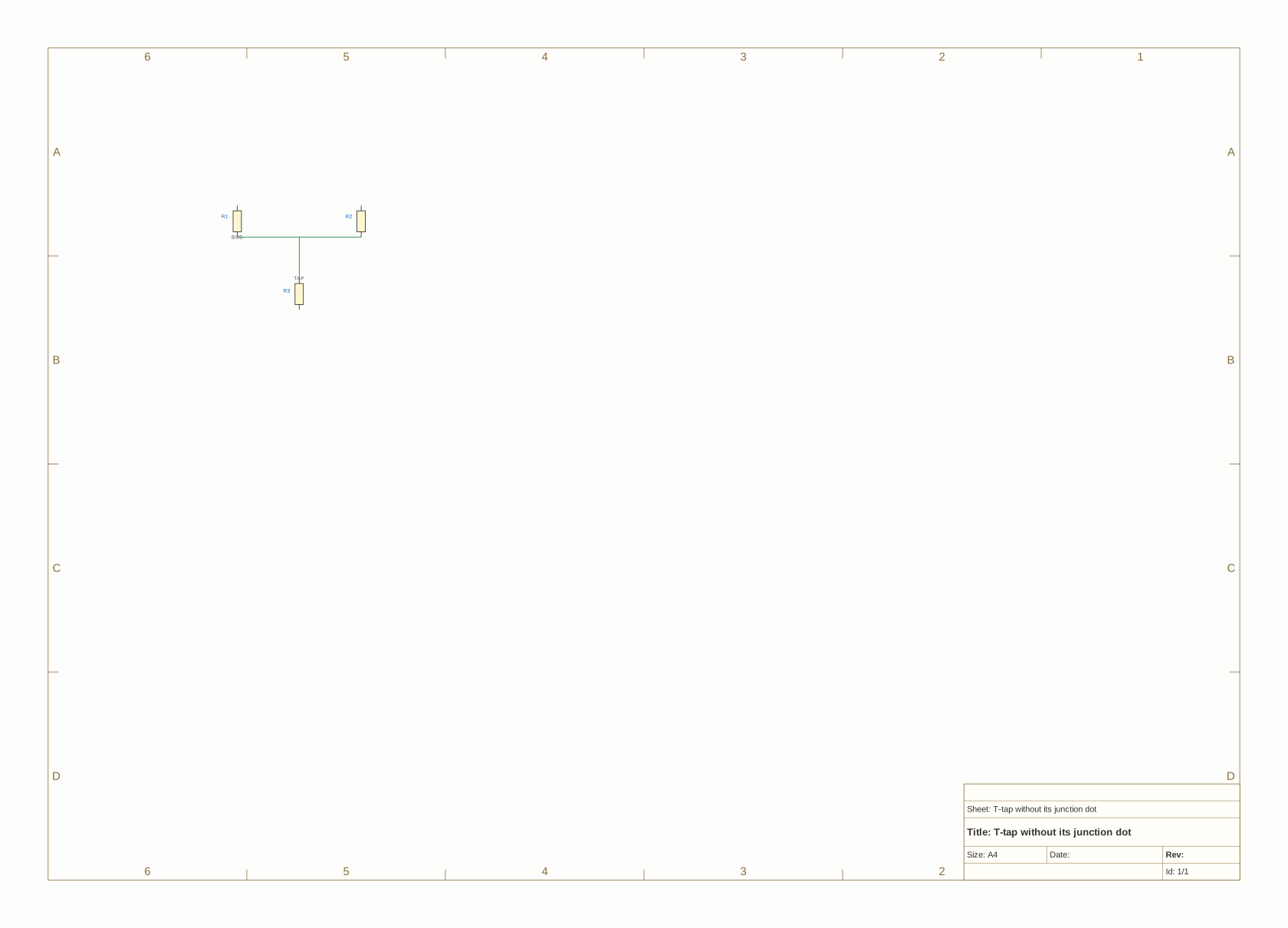
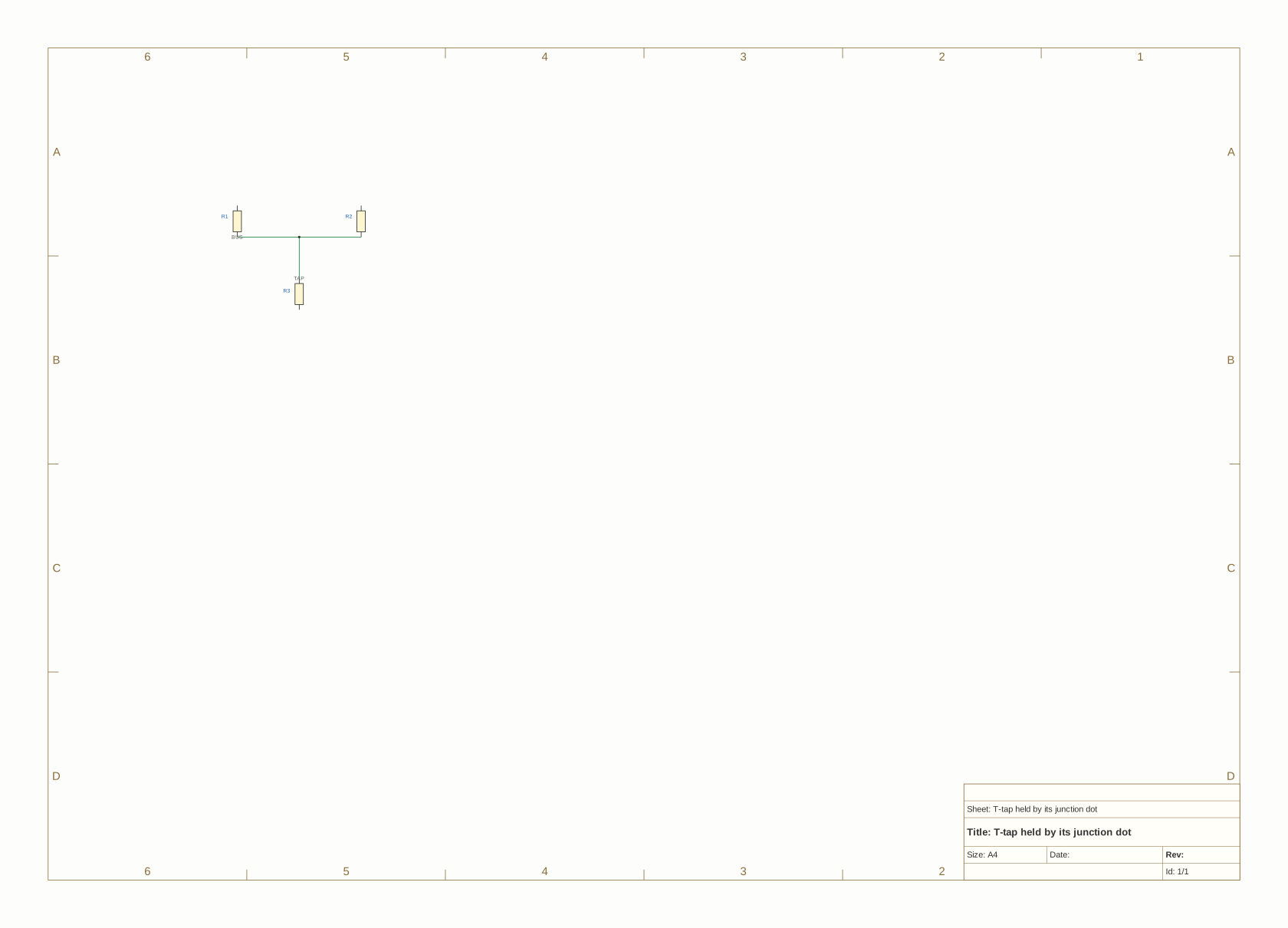
The second has a dot where the vertical wire meets the horizontal one. Nothing else differs. On a dense sheet, a mark like that goes through a design review unnoticed.
$ agni stats readers/kicad/testdata/tjunc.kicad_sch
components:          3 (unique ref_des)
nets:                5
$ agni stats readers/kicad/testdata/tjunc_dotted.kicad_sch
components:          3 (unique ref_des)
nets:                4
Same parts, different circuit. One file has five nets and the other has four.
The reason is a KiCad convention that trips up nearly everyone the first time. A wire crossing another, or ending on the middle of one, is not a connection. Only a junction dot makes it one. The rule exists so you can route a wire across a busy sheet without accidentally shorting it to everything it passes over. That is genuinely useful. It also means a drawing that looks connected may not be.
Ask what actually changed:
$ agni diff readers/kicad/testdata/tjunc.kicad_sch readers/kicad/testdata/tjunc_dotted.kicad_sch
diff readers/kicad/testdata/tjunc.kicad_sch -> readers/kicad/testdata/tjunc_dotted.kicad_sch

Components: +0  -0  ~0
Nets:       new 0  deleted 1  renamed 0  hard 1  soft 0

Nets changed (2):
  [deleted] /TAP
  [hard]    /BUS: +[R3.1] -[]
The net /TAP is gone, because it merged into /BUS. And /BUS gained R3.1, a pin it did not have before. In the version without the dot, R3 sits on a net of its own that reaches nothing else on the board. In the version with it, R3 is on the bus.
That is the failure mode in full. The author drew a T, meaning “connect these”. The reviewer saw a T and read it the same way. The netlist has two separate nets, and R3 does nothing.
The rule reports on each file like this:
$ agni check --verdicts --rule wire-no-junction readers/kicad/testdata/tjunc.kicad_sch
wire-no-junction  1 fail
    fail  65000000,-50000000  the endpoint lands on another wire's body and nothing joins them
                              there, so the drawing shows one net where the netlist has two

1 verdicts across 1 rule(s), 1 fail
$ agni check --verdicts --rule wire-no-junction readers/kicad/testdata/tjunc_dotted.kicad_sch
wire-no-junction  1 pass
    pass  65000000,-50000000  the endpoint lands on another wire's body and a junction dot joins
                              them, so the 3 wire ends meeting here are one net

1 verdicts across 1 rule(s), 1 pass
The second run reports a pass rather than saying nothing. That is recent (agni issue 420), and it needed a reader change. One step in the reader makes a dot electrically real, and the same step erases the evidence that a tap was ever there. So the reader computed which taps were joined and then threw that half away. Before the change, a sheet with every tap dotted produced the same silence as a sheet with no taps. A pass you can count is worth more here than almost anywhere else in the catalog, because this defect is invisible in review by construction.
Names are wires too (EE2) 
The opposite problem. A schematic can also hide a connection that is genuinely there.
Take two pins on opposite corners of a sheet, with no wire drawn between them. If they carry the same label, they are connected. Everyone uses labels to keep a dense sheet readable, and every power symbol works the same way. So every GND symbol on every sheet is one net, while the drawing shows twenty separate little triangles.
So a name is a connection, and renaming a net can rewire the board. Give two unrelated nets the same label and they merge. Change one label of a pair and they split.
That makes names checkable, and gives two rules that are mirror images:
$ agni check --rule label-alias-conflict --rule power-tap-conflict cmd/agni/testdata/conformance/netalias.fires.kicad_sch
findings by rule:
  label-alias-conflict   1
  power-tap-conflict     1

first 2:
  [warning] label-alias-conflict: /SIG_A (one net carries rival labels in the same sheet scope: /SIG_A, /SIG_B)
  [warning] power-tap-conflict: +3.3V (one net is claimed by rival design-wide names: +3.3V, +3V3)

2 finding(s) total
10 subject(s) considered by 2 rule(s) (--verdicts for the detail)
Both of those are one net with two claims on its identity. label-alias-conflict is two ordinary labels in the same scope; power-tap-conflict is two design-wide names, +3.3V and +3V3. A human reads them as obviously the same rail. A tool must not, because deciding they are the same is a guess, and that kind of guess merges two nets nobody meant to merge.
And the mirror:
$ agni check --rule duplicate-net-name cmd/agni/testdata/conformance/dupname.fires.edn
findings by rule:
  duplicate-net-name     2

first 2:
  [warning] duplicate-net-name: VCC (this name is stated by 2 electrically distinct nets)
  [warning] duplicate-net-name: VCC (this name is stated by 2 electrically distinct nets)

2 finding(s) total
3 subject(s) considered by 1 rule(s) (--verdicts for the detail)
One name, two nets, not connected. Somebody has two things called VCC and believes they are one thing. Whether that is a typo or a deliberate reuse across scopes, it is worth knowing before the board is built.
The third variant is the tap fixture again with a label instead of a dot. Put a label where the tap meets the through-wire, and the label joins them just as firmly as a junction dot does, because naming a point puts it on that net. That is correct KiCad behaviour. A label is also much easier to delete by accident, so wire-no-junction’s pass says which construct is holding the tap together rather than only that something is.
Wires that reach nothing (EE2) 
The simplest case, and still worth a rule. A wire drawn from a pin out into empty space, ending on no pin, no junction and no label.
Nothing electrical happens. The wire contributes nothing, and whatever it was meant to reach is unconnected. Usually somebody started drawing it and got interrupted, or moved the part it pointed at and left the stub behind (you will do this yourself, and the check is how you find out).
dangling-endpoint reports these, and the subject is a coordinate rather than a component, because a wire end that reaches nothing has nothing else to be named after. It shares that with wire-no-junction above, and those two are the only rules in the catalog whose findings name a location on a sheet rather than a thing on the board. The difference comes from what they examine. Both are checks about the drawing rather than about the board.
What the reader can and cannot see (EE2) 
Nothing in this chapter survives into the netlist, and that fact explains a whole corner of the tool. A junction dot, a wire that ends in space and a label sitting mid-span are all facts about the drawing. By the time the design is a list of nets and pins, the dot has done its work and disappeared, and the dangling wire has left no trace at all. The netlist cannot tell you a dot was missing, because a missing dot just looks like two nets that were always separate.
So these checks have to happen in the reader, at the moment the file is parsed, and the reader attaches its answers to the design as diagnostics. That makes them input diagnostics rather than analysis checks, and they behave differently from the rest of the catalog. wire-no-junction reports not-applicable on a netlist format like EDIF rather than passing, because EDIF has no wires in it to examine and a clean result there would mean nothing.
This is also the limit of the whole approach. A tool reading a netlist can tell you what the netlist says. Whether the netlist matches what the designer meant is a question about intent. This chapter’s defects are catchable only because the drawing keeps enough evidence of intent for a reader to notice the mismatch.
What you can now answer 
- Why “are these two pins connected” cannot be answered by looking at the picture. (EE2)
- Why a junction dot is not decoration, and what happens to the netlist without one. (EE2)
- Why renaming a net can rewire a board, and why two spellings of one rail is a finding rather than a tidy-up. (EE2)
- Why these particular checks live in the reader and report not-applicable on some formats. (EE2)
The rules this page explains 
| Rule | What it catches |
|---|---|
wire-no-junction |
a tap that looks connected and is not |
dangling-endpoint |
a wire ending on nothing |
label-alias-conflict |
one net, two rival labels |
power-tap-conflict |
one net, two rival design-wide names |
duplicate-net-name |
one name, two unconnected nets |
single-pin-net |
a net reaching only one pin, which is often the downstream symptom of the above |
The next chapter, Why every chip needs capacitors, moves from “is it connected” to “why is that part there at all”.